General information for all Delegates
conference structure
Session length: The conference sessions vary in length so please ensure you are aware of this when planning your time.
The final session of each day (sessions 2, 6, 10 & 14) will be 120 minutes long.
The rest of the panel sessions will be 90 minutes.
There are also lunchtime workshops on Tuesday 30th June that vary in length & lunchtime panel sessions on the 1st, 2nd & 3rd July that are 60 minutes
Location of sessions: The conference will be taking place at multiple locations:
- Facultat de Geografia i Història – UB on the 29th June, 1st July, 2nd July & 3rd July
- Hotel Exe Campus, Facultat Ciencies-UAB & ICTA-UAB on Tuesday 30th June
- Museu Marítim de Barcelona for certain sessions on Thursday 2nd July
Presentation length: For a traditional format panel, speakers will typically have 15 minutes per presentation, however POLLEN2026 contains many panels that have opted for different presentation lengths or different structures, so please check with your panel convenors if you are unsure.
Refreshment breaks: These last 30 minutes in between panel sessions, refreshments will be served in the large open spaces on the 2nd & 3rd floors of Facultat de Geografia i Història – UB.
Lunch breaks: There is no catering for lunches at the conference so delegates will need to make their own arrangements for lunch.
- On Tuesday 30th June the lunch break is 3 hours. There are limited options available at the UAB campus, but it is only a short train ride to nearby towns with a far more restaurants. If you are attending a workshop you may need to bring a packed lunch.
- On 29th June, 1st July, 2nd July & 3rd July the lunch breaks are 2 hours. In the heart of Barcelona there is a vast array of options from local delis, cafes and restaurants, within a few minutes walk from the conference venue.
Planning your conference time
Please remember to check your panel’s date and start time on the Panel pages and to familiarise yourself with the general daily timetable, there are lots of interesting events planned outside of panel sessions, some require pre-registration, so don’t miss out!
Please ensure you are happy with the data you have for your panel in our login environment: the title, abstracts, order of papers, distribution of papers.
Contact details
The fields from the “Personal” tab of your account that end up on the delegate badge are your name and institution. It is perfectly fine to not indicate an affiliation if you are an independent researcher/practitioner etc. However, you may have forgotten to insert the information when entering your details for the first time, and in fact want to show your affiliation. If that is the case, do add it and remember to click “Update” once done!
You can also add a short biography and even a portrait/avatar here, which can then be seen in the online programme.
If you have any queries or need to get in touch with the conference organisers you can do so via email on pollen(at)nomadit.co.uk.
Contacting other delegates from the programme
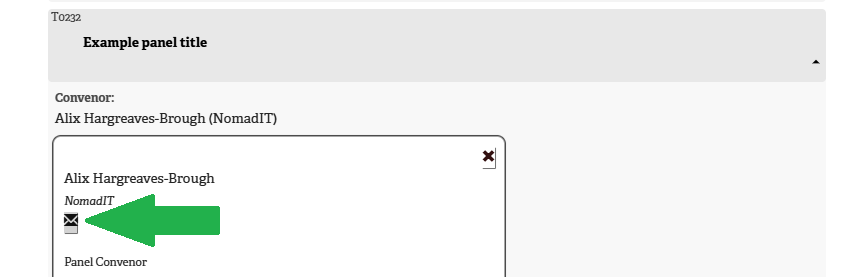
While participant’s email addresses are not displayed on the panel pages for privacy reasons, there is an in-built secure email messaging system which allows site visitors to email convenors and accepted presenters from the Conference Programme page.
Logging into your account first makes this quicker
Contacting participants in your panel
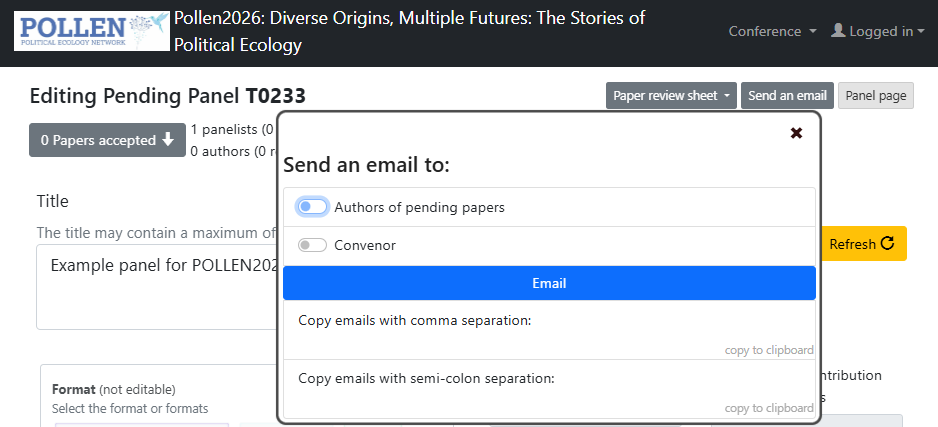
You can easily email any or all the participants of your session through the editing page accessible from your account. Use the “Send an email” button, then select select which group(s) in the panel you wish to contact from the list. Then the “Email” button will open a new email in your default application or you can copy the email addresses using the buttons below that.
managing your Proposals
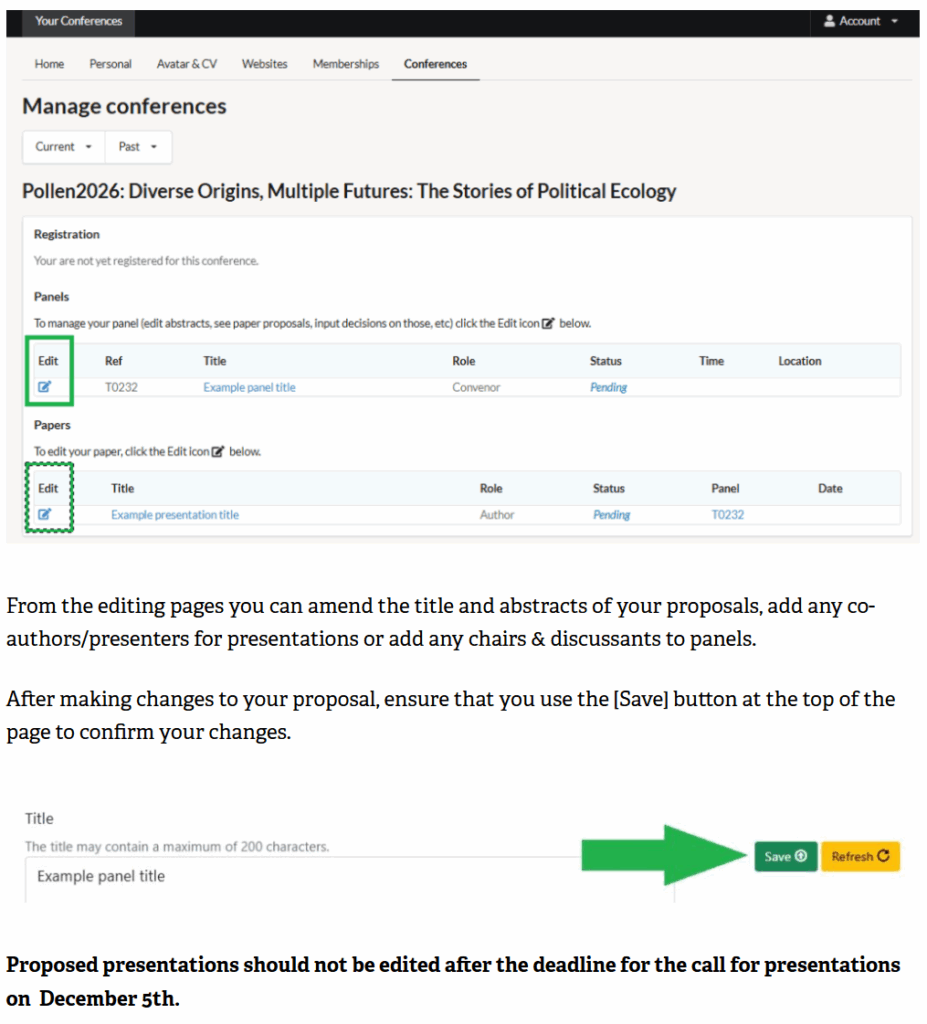
To view your panel, workshop, roundtable or presentation, LOGIN, using your email and password when prompted to enter the platform. We suggest ticking ‘Remember me’ to stay logged in, if using your own computer, as this makes life easier later.
Editing your abstracts
Participants can use the editing page accessible using the icon to the left of the proposal title in the conferences tab of their account to edit their proposals.
Acknowledging non-attending co-authors and collaborators
For co authors who will not be attending POLLEN2026, please enter these in the “Acknowledgements” section. Ensure to confirm these changes with the [Save] button at the top of the page.
Circulation of papers
POLLEN does not require prior circulation of papers; however if you wish to do this for your panel, each author can upload a PDF of their paper (not of their abstract!) into their paper edit page and this is then available to co-panelists for download from your panel page on the site. If you subsequently wish these to be available more widely, please let us know so we can alter their visibility to delegates or public.
Convenors
Convening a panel is a great opportunity, but also a serious responsibility – to presenting colleagues, the conference, the field. We have tried to itemise below the various aspects of convenors’ work we’d like you to keep in mind over the conference process. Please get in touch if you have questions: pollen(at)nomadit.co.uk
We have put together a list of Guidelines for convening a panel on the day.
Convenor responsibilities
It is the convenors’ responsibility to ensure that all session participants are well briefed and that panels, roundtables and workshops meet POLLEN2026 requirements.
To that end, convenors should not only communicate their decisions about proposals to their session, but also later in the process email the participants to inform them of:
- the speaking order (this will also be displayed on the website panel page)
- how much time they have to present
- the need to register to attend the conference once registration begins (the registration status of participants can be seen on the editing page accessible through your account)
- any late changes, additional participants, and any other information relevant to the session.
If participants withdraw, convenors should mark these withdrawals in the login environment and email or cc the organisers: pollen(at)nomadit.co.uk
Ordering the presentations in your sessions
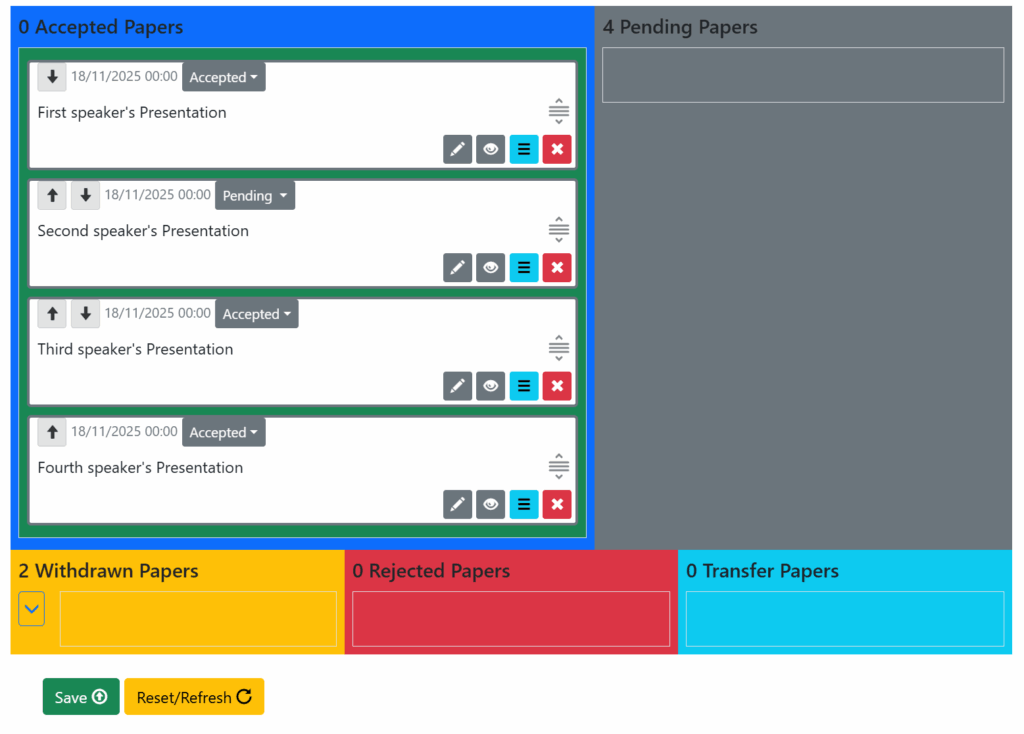
Accepted proposals can be placed into the correct order in two ways either:
- drag-and-drop them into the correct place
- use the arrows on the top left of each presentation to move them up and down
Ensure that you click the [Save] button at the bottom of the page to confirm your changes.